Monday, March 12, 2012

Download LightLogger Keylogger v3.3.5.2

Name : LightLogger Keylogger
Version: 3.3.5.2
Program size : 1.86 MB
Operating System : Windows XP / Vista / 7
Publisher : hwsuite
License / Price : Trial - Buy Now $39.95
Link In Slatweb Page
Publisher's Description
LightLogger Keylogger is monitoring software that secretly records nearly all activity on your PC. Compatible with Windows 7, Vista, and XP, LightLogger is highly customizable and comes with a powerful set of monitoring tools that allow you to track the actions of anyone using your computer.

Use LightLogger to monitor your children's computer use and web browsing, including messages they send or post on web pages, in emails, and on social networking sites. Monitor co-workers' use of your PC and web surfing activity with LightLogger.

You can configure LightLogger to start when Windows starts. And setting LightLogger to run in stealth mode makes it virtually undetectable by most users, an essential feature for monitoring software.

LightLogger's keylogger captures keystrokes made in any application or web page, including Windows login fields and text copied to Windows clipboard. LightLogger's monitoring software can also track every website (including URLs) visited and record every application run on your PC. You can even configure LightLogger to take screen shots of your monitor's content at time intervals you select.

A small, easy-to-use application, LightLogger has an interface you can set to display in any of six languages, English, Italian, French, Deutsch, Spanish, or Portuguese. You can contact LightLogger support through the application itself or search the comprehensive support FAQs in the LightLogger forum for information on using any feature of the monitoring software.

Download the trial version of LightLogger keylogger and monitoring software to evaluate its features. Trials are limited to three days, do not run in stealth mode, and display an expiration notice every hour. If you are happy with LightLogger, you can buy a license key and activate all LightLogger's features.

News:
- Added support of 64-bit systems.
- Improved keylogger component.
- Added URL, Application, Clipboard monitoring and Screen capture.
- Added Invisible mode.
- Mojor improvements for Windows Vista and Windows 7.
    Features
    LightLogger's versatile functions monitor all activity on your PC:
        Great for Concerned Parents
        See HWSuite's articles on using LightLogger to protect your child from the dangers of the internet.
        Stealth Mode
        Use stealth Mode to hide LightLogger from all but the most sophisticated users.
        Keystroke Monitoring
        Record keystrokes typed in any PC or web application.
        Application Monitoring
        Record all applications opened on your PC.
        Website Monitoring
        Track websites (including URLs) visited.
        Multi-language support
        Set LightLogger's display to use any of six languages, English, Italian, French, Deutsch, Spanish, or Portuguese.
        Screen Captures
        Configure LightLogger to make and save screen captures at intervals you select.
        Windows 7, Vista, XP Support
LightLogger works on three popular Windows operating systems.

Download LightLogger Keylogger v3.3.5.2

Name : LightLogger Keylogger
Version: 3.3.5.2
Program size : 1.86 MB
Operating System : Windows XP / Vista / 7
Publisher : hwsuite
License / Price : Trial - Buy Now $39.95
Link In Slatweb Page
Publisher's Description
LightLogger Keylogger is monitoring software that secretly records nearly all activity on your PC. Compatible with Windows 7, Vista, and XP, LightLogger is highly customizable and comes with a powerful set of monitoring tools that allow you to track the actions of anyone using your computer.

Use LightLogger to monitor your children's computer use and web browsing, including messages they send or post on web pages, in emails, and on social networking sites. Monitor co-workers' use of your PC and web surfing activity with LightLogger.

You can configure LightLogger to start when Windows starts. And setting LightLogger to run in stealth mode makes it virtually undetectable by most users, an essential feature for monitoring software.

LightLogger's keylogger captures keystrokes made in any application or web page, including Windows login fields and text copied to Windows clipboard. LightLogger's monitoring software can also track every website (including URLs) visited and record every application run on your PC. You can even configure LightLogger to take screen shots of your monitor's content at time intervals you select.

A small, easy-to-use application, LightLogger has an interface you can set to display in any of six languages, English, Italian, French, Deutsch, Spanish, or Portuguese. You can contact LightLogger support through the application itself or search the comprehensive support FAQs in the LightLogger forum for information on using any feature of the monitoring software.

Download the trial version of LightLogger keylogger and monitoring software to evaluate its features. Trials are limited to three days, do not run in stealth mode, and display an expiration notice every hour. If you are happy with LightLogger, you can buy a license key and activate all LightLogger's features.

News:
- Added support of 64-bit systems.
- Improved keylogger component.
- Added URL, Application, Clipboard monitoring and Screen capture.
- Added Invisible mode.
- Mojor improvements for Windows Vista and Windows 7.
    Features
    LightLogger's versatile functions monitor all activity on your PC:
        Great for Concerned Parents
        See HWSuite's articles on using LightLogger to protect your child from the dangers of the internet.
        Stealth Mode
        Use stealth Mode to hide LightLogger from all but the most sophisticated users.
        Keystroke Monitoring
        Record keystrokes typed in any PC or web application.
        Application Monitoring
        Record all applications opened on your PC.
        Website Monitoring
        Track websites (including URLs) visited.
        Multi-language support
        Set LightLogger's display to use any of six languages, English, Italian, French, Deutsch, Spanish, or Portuguese.
        Screen Captures
        Configure LightLogger to make and save screen captures at intervals you select.
        Windows 7, Vista, XP Support
LightLogger works on three popular Windows operating systems.

Download LightLogger Keylogger v3.3.5.2

Name : LightLogger Keylogger
Version: 3.3.5.2
Program size : 1.86 MB
Operating System : Windows XP / Vista / 7
Publisher : hwsuite
License / Price : Trial - Buy Now $39.95
Link In Slatweb Page
Publisher's Description
LightLogger Keylogger is monitoring software that secretly records nearly all activity on your PC. Compatible with Windows 7, Vista, and XP, LightLogger is highly customizable and comes with a powerful set of monitoring tools that allow you to track the actions of anyone using your computer.

Use LightLogger to monitor your children's computer use and web browsing, including messages they send or post on web pages, in emails, and on social networking sites. Monitor co-workers' use of your PC and web surfing activity with LightLogger.

You can configure LightLogger to start when Windows starts. And setting LightLogger to run in stealth mode makes it virtually undetectable by most users, an essential feature for monitoring software.

LightLogger's keylogger captures keystrokes made in any application or web page, including Windows login fields and text copied to Windows clipboard. LightLogger's monitoring software can also track every website (including URLs) visited and record every application run on your PC. You can even configure LightLogger to take screen shots of your monitor's content at time intervals you select.

A small, easy-to-use application, LightLogger has an interface you can set to display in any of six languages, English, Italian, French, Deutsch, Spanish, or Portuguese. You can contact LightLogger support through the application itself or search the comprehensive support FAQs in the LightLogger forum for information on using any feature of the monitoring software.

Download the trial version of LightLogger keylogger and monitoring software to evaluate its features. Trials are limited to three days, do not run in stealth mode, and display an expiration notice every hour. If you are happy with LightLogger, you can buy a license key and activate all LightLogger's features.

News:
- Added support of 64-bit systems.
- Improved keylogger component.
- Added URL, Application, Clipboard monitoring and Screen capture.
- Added Invisible mode.
- Mojor improvements for Windows Vista and Windows 7.
    Features
    LightLogger's versatile functions monitor all activity on your PC:
        Great for Concerned Parents
        See HWSuite's articles on using LightLogger to protect your child from the dangers of the internet.
        Stealth Mode
        Use stealth Mode to hide LightLogger from all but the most sophisticated users.
        Keystroke Monitoring
        Record keystrokes typed in any PC or web application.
        Application Monitoring
        Record all applications opened on your PC.
        Website Monitoring
        Track websites (including URLs) visited.
        Multi-language support
        Set LightLogger's display to use any of six languages, English, Italian, French, Deutsch, Spanish, or Portuguese.
        Screen Captures
        Configure LightLogger to make and save screen captures at intervals you select.
        Windows 7, Vista, XP Support
LightLogger works on three popular Windows operating systems.
Download RAR Password Cracker v4.12

Name : RAR Password Cracker
Version: 4.12
Program size : 0.298 MB
Operating System : Windows All
Publisher : dnsoft
License / Price : Trial - Buy Now $30.00
Link In Slatweb Page
Publisher's Description
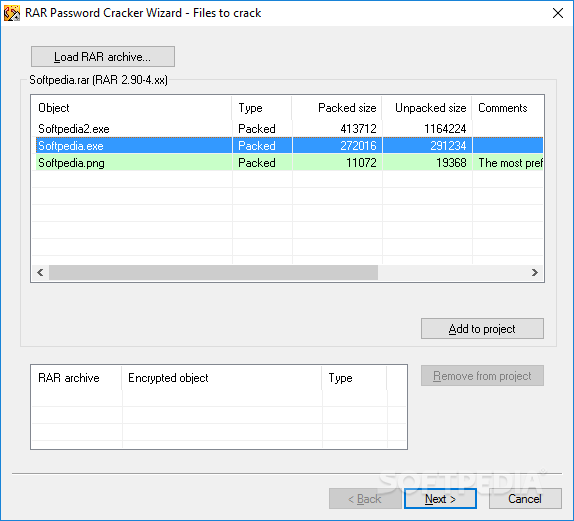
  This program is intended to recover lost passwords for RAR/WinRAR archives of versions 2.xx and 3.xx. The program finds by the method of exhaustive search all possible combinations of characters ("bruteforce" method), or using passwords from lists ("wordlist" or "dictionary" method). Self-extracting archives and multivolume archives are supported. The program is able to save a current state (you can interrupt the program at any time, and restart from the same state later). Estimated time calculator allows you to configure the program more carefully.
Are you really looking for password recovery software for Microsoft® Office (Word/Excel/Access) or Money? www.PasswordRecoveryTools.com!
or
use Rixler Password Recovery Server for guaranteed decryption Microsoft® Word/Excel files. Also, Rixler Software offers password recovery tools for most of Email, FTP and Messenger Clients, popular Browsers, MS Office appications, Zip, Windows Logon and others.
System requirements
RAR Password Cracker requires Windows 9x/ME/XP/NT4/2000/2003. There are no special requirements for memory capacity, but the processor performance should be as high as possible. Special hardware is not required.
What's new
Version 4.12
Fixed: Permanent crashes on some types of files.
Added: New type of licenses: low-cost time-limited fully functional version.
    Version 4.11
    Fixed: Memory management to avoid "Not enough memory" error.
    Fixed: RAR 2.00-2.80 performance degradation.
    Added: "First uppercase, rest lowercase [Password]" modificator.

      Download Disk Secure Eraser v1.0.4

      Name : Disk Secure Eraser
      Version: 1.0.4
      Program size : 0.620 MB
      Operating System : Windows 9X / ME / NT / 2K / XP / 2003
      Publisher : morimosoft
      License / Price : Trial - Buy Now $20.00
      Link In Slatweb Page
      Publisher's Description
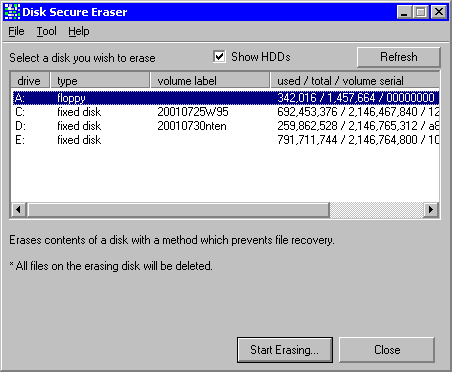
      Erases all files and data on a storage media really and completely, so as to prevent your information properties leaking out.
      When you remove files on ZIPs, MOs, memory cards, USB storages and all storage media in a ordinary way such as removing with Windows Explorer, the files may not be erased really. Even formatting may not wipe the data completely on the media. They are just marked as hidden from your eyes on the most cases. Some data recovery softwares can revive them from the media, or may pick up some fragments of the data. When disposing or passing a storage media to someone to transport files, through these hidden data blocks on the media, your important information properties may leak.
      Disk Secure Eraser erases disk contents with a method which prevents such data capturing actions.
      *Restriction* Cannot erase system drive (which is typically C: drive).
      For Windows XP, 2000, NT4.0 and Windows Me, 98, 95.

      Share On Facebook Digg This Post Stumble This Post Tweet This Post Save Tis Post To Delicious Float This Post Share On Reddit Bookmark On Technorati